
Monster-collecting adventure Aniimo can be perfectly enjoyed solo, but you can also co-op with your buddies to enjoy a shared tale. The process is pretty simple, but it will be likely locked until both of you clear the early parts of the game. You can do this by hosting a co-op session or join the one hosted by your buddy.
Let’s find out how the system works.
For starters, you’ll need to reach Level 14 on your character, which will unlock the ability to add friends and parties. You can find random players to add as your buddies. To add your friend, you’ll need their user ID.
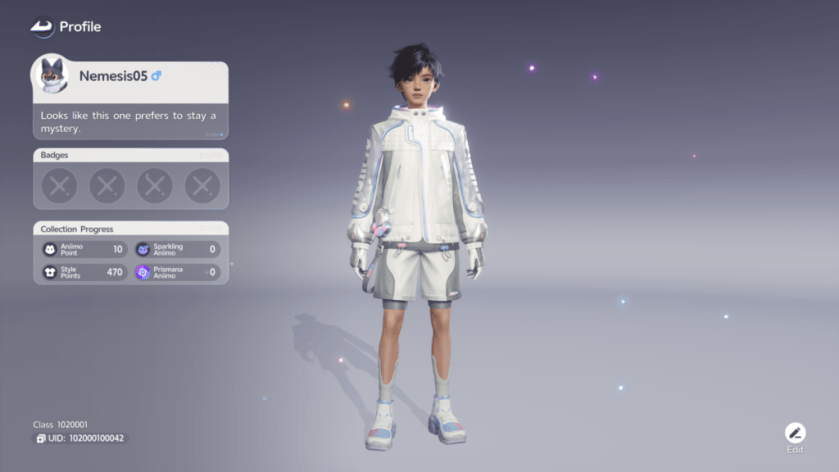
You can find the user ID by going to your character screen and checking the bottom left-corner. Once your friend sends you their ID (or you send them yours), you can then add them to your friend list.
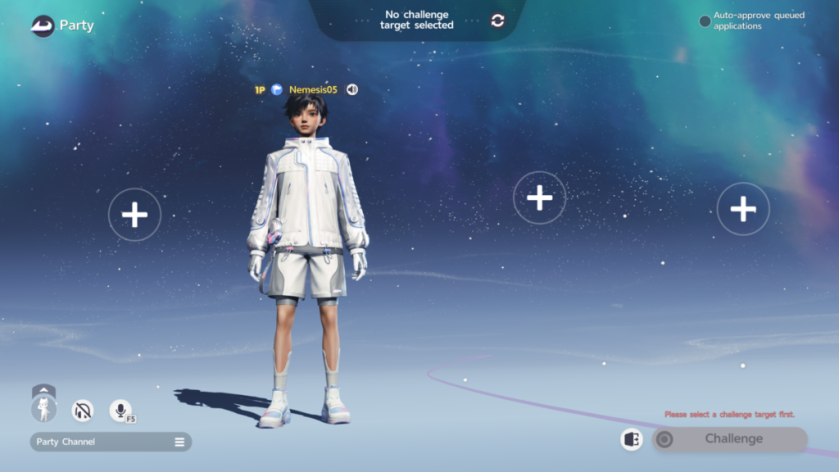
Once you have added your friend to the game, open the menu and choose Party. First, select a challenge where you want to participate. You can then invite your friend to join your session. Once they accept your request, the two of you can then play the same session.
You can only co-op with your friend if the two of you are on the same server. You can’t co-op with someone on a different server. To do so, at least one of you’ll need to migrate to the common server.
سەرچاوەی فەرمی بە زمانی ئینگلیزی: https://www.destructoid.com/how-to-co-op-with-friends-in-aniimo/