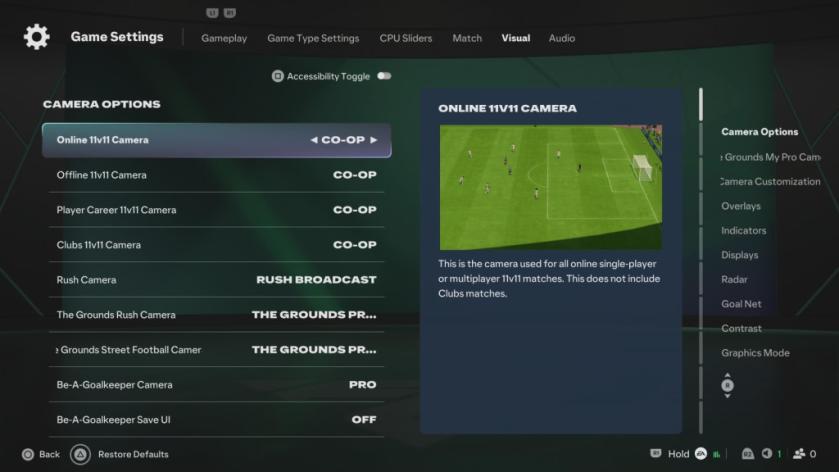

FC 27 is now out on PC and consoles, and your first bit of business should be to adjust the Camera and Controller. If you have played FC 26 on the same account and platform, your previous settings will be retained. However, you’ll still need to introduce some changes to get an advantage over your opponents. If you’re new, you have to complete the entire process from scratch.
Let’s find out how to get the best possible settings in the Camera department first.
Setting the camera to Co-op is a must, and more so this year as you’ll need to have a complete view of the pitch. I have tested all the viable camera angles and Co-op simply leads to the best results.
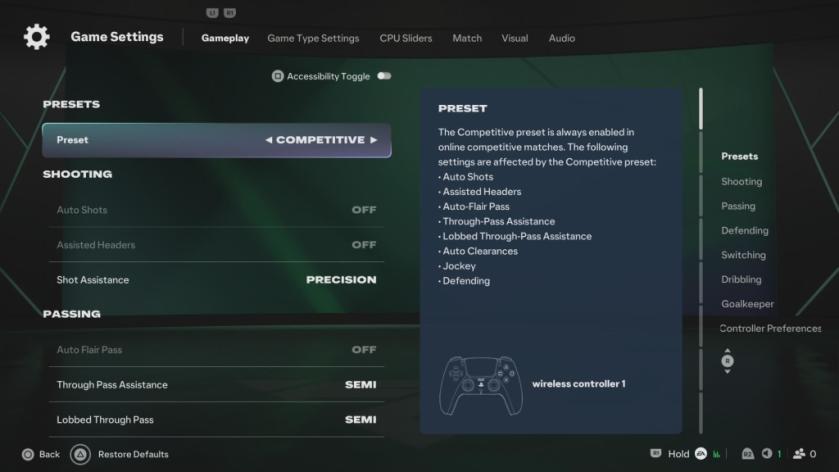
That’s it when it comes to the best Controller settings. You should follow the same settings irrespective of the platform you’re playing the game on. If you’re on a PC and yet to tweak your settings, have a look at this guide.
سەرچاوەی فەرمی بە زمانی ئینگلیزی: https://www.destructoid.com/best-camera-and-controller-settings-in-fc-27/