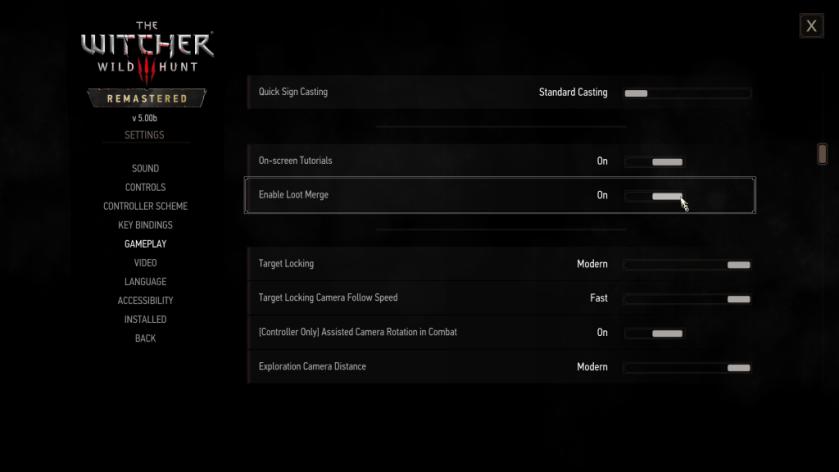

The Witcher 3: Remastered might seem like a graphical overhaul for large parts, but the Loot Merge system is one of several QoL improvements CDPR has added to the game. This is a brand-new feature that you can enjoy on both PC and console version of the game.
Let’s understand how the system works and how you can turn it on (and turn it off) in The Witcher 3: Resmastered.
The core principle of the Loot Merge system is to make the looting part easy. Earlier, we had to move to the location of a loot and then click on it to pick it up. Now, the loot will be consolidated at a singular location for you to pick it up. Let’s understand it better with an example.
Suppose, you have killed six different enemies as Geralt. They might be of the same type of different. Under the older system, you’ll need to check the corpse of each enemy to find out the loot. Now, all the loot (from all six enemies) will be available at one location. Hence, it saves you time since you no longer need to hit six different spots. Moreover, when you loot a specific item from one source, you get the same item from all other sources at the single click of a button.
In simple words, the Loot Merge system is a massive new addition if you have started a new campaign. But first, you’ll have to turn it on.
If you wish to turn it off for whatever reason it might be, you can go to the same option to do what is required.
Tags:
The Witcher 3: Wild Hunt
سەرچاوەی فەرمی بە زمانی ئینگلیزی: https://www.destructoid.com/how-to-use-loot-merge-in-the-witcher-3-remastered/